How to optimize WordPress with Ubuntu VPS

Ubuntu Virtual Private Server optimized for WordPress

Author: .

  • Google Review plugins for WordPress

    In a highly competitive market, Google Reviews is a great tool to convince customers that the manufacturer is of the highest quality in every way 📈. One of our clients claims that services such as Trustpilot and Google Reviews are among the more essential tools for gaining new customers. Below, we’ve listed five WordPress plugins for Google Reviews.

    Google Reviews Widget By RichPlugins

    Google Reviews Widget on WordPress org

    Google Reviews Widget home page.

    Google Reviews Widget
    (453 total ratings)
    Google reviews widget and shortcode! Shows Google reviews on your WordPress website to increase user confidence and SEO.
    RichPlugins
    60,000+ active installations
    Tested with 5.3.3

    WP Google Review Slider By LJ Apps

    WP Google Review Slider on WordPress.org

    WP Google Review Slider homepage.

    WP Google Review Slider
    (138 total ratings)
    Easily create a slider to display your Google Places business reviews in your Posts, Pages, and Widget areas!
    LJ Apps
    20,000+ active installations
    Tested with 5.4.1

    Reviews and Rating – Google Business By Noah Hearle, Design Extreme

    Reviews and Rating – Google Business on WordPress.org

    Reviews and Rating – Google Business homepage

    Reviews and Rating – Google Business
    (30 total ratings)
    Shortcode and widget for Google reviews and rating. Give customers a chance to leave their own rating/review; includes Structured Data for SEO.
    Noah Hearle, Design Extreme
    5,000+ active installations
    Tested up to: 5.4.1

    Expensive solutions

    These Google Reviews solutions are not available through WordPress.org

    Embedsocial

    WP Business Reviews is the solution that we previously used.

  • WebP was the image 📷 format for the Web. Now it is AVIF.

     
    WebP lossy images are 25-34% smaller than comparable JPEG images at equivalent SSIM quality index. Now AVIF is usually even smaller and better. AVIF is fully supported by Google and major browsers.

    Visit the WebP homepage

    WebP is a modern image format that provides superior lossless and lossy compression for images on the web. Using WebP, webmasters and web developers can create smaller, richer images that make the web faster.


    WebP lossless images are:

    • 26% smaller in size compared to PNGs
    • WebP lossy images are 25-34% smaller than comparable JPEG images at equivalent SSIM quality index

    Microsoft Edge Beta supports WebP

    With the beta version of Microsoft Edge browsers, almost all the major players support WebP.


    85% to 95% of desktop browsers supports WebP

    For mobile and tablets, the numbers are somewhat lower.
    Apple Safari is the last major browser lacking WebP support. [May 2020]


    If Apple supports WebP in future versions, more than 90% of browsers will support WebP on all platforms.

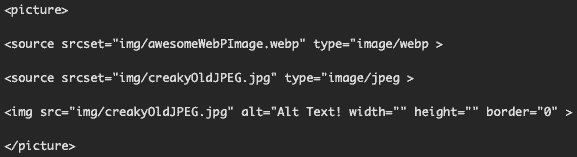
    Use WebP for all browser now with the “picture” tag

    Use a PNG or JPG image as “fallback” for browsers that dosn’t support WebP yet.

    Replace the old “img” tag:

    Ordinary code for inserting pictures

    with the “picture” tag and server images to all browsers:

    Use PNG og JPG as fallback if the brower don't support WebP

    Batch converting images to WebP

    Using WebP Images

  • Easy to use alternatives to WordPress

    WIX and Weebly are the two best alternatives to WordPress
    Sometimes the conclusion is that WordPress is just an overkill for your needs. Some come to the conclusion that WordPress is simply “too much”.

    WordPress alternatives

    There are simpler and equally good alternatives to WordPress.

    and

    WIX and Weebly are the two best alternatives to WordPress

    Connect with a WIX expert

    Upwork, Freeup and Freelance is where you find Weebly and Wix experts as well as experts on most other things related to the Internet.

    Fast and simple migration from WordPress to Wix

  • ⛓ How to get better e-mail security ⚙️ with SPF, DKIM and DMARC

    When you have access to Google Suite admin panel and ClouDNS admin bane, you can set up SPF, DKIM and DMARC as described here:

    Enhance security for outgoing email (DKIM)

    Enhance security

    Authenticate email with DKIM. Set up DKIM to prevent email spoofing

    Authenticate email

    How to Control Spam within G Suite Email with SPF and DKIM

    Mange SPF and DKIM

    Enhance security for forged spam (DMARC). Turn on DMARC. Manage suspicious emails with DMARC.

    More about DMARC

    To prevent ID theft, spam and other forms of attack, you email should be configured for:

    • SPF
    • DKIM
    • DMARC

    In 2015, many companies and organizations upgraded and modified their email systems to make them more effective against spam. The disadvantage of this is that it seems that legitimate email sometimes could be erased as SPAM. By using SPF, DKIM and DMARC, you can prevent emails you send being deleted as SPAM by accident. If the e-mail you send incorrectly is deleted as e-mail, you will find the procedure described here. If e-mails sent to you are erroneously deleted as SPAM, you can forward this message.

    To prevent emails you send into the recipient’s SPAM filter, you have 3 tools at your disposal:

    • SPF
    • DKIM
    • DMARC

    Abuse of your email address

    These three tools prevent crooks from using your email address to send email with your email address as the sender and reply address. If scoundrels try to abuse your email address, you can choose to automatically be notified via email through the DMARC service.

    Here you activate SPF, DKIM and DMARC

    To configure and enable these tools, log in to:
    Google Suite admin paneland on
    ClouDNS admin panel
    Detailed instructions can be found on the links below.
    See how to access the ClouDNS control panel here:
    Create you CLouDNS account.

    Technical information

    Description of the three security solutions:

    SPF

    Visit this page for more details:
    Set ups SPF with Google Suite

    DKIM

    Visit this page for more details:
    How to setup DKIM with Google Suite

    DMARC

    Visit this page for more details:
    How to setup DMARC with Google Suite

    ClouDNS.net

    Visit this page for more details:
    Get access to the ClouDNS admin panel

    Access to Google Suite admin panel

    Visit this page for more details:
    Google Suite admin panel

    Disadvantages

    Only drawback with these three tools is that you should only use SMTP servers for Google to send emails from copiers and other network connected devices.

    Details if you want to do the work yourself can be found here.
    TBT is happy to help you make changes so your scanners, copiers, fax machines, webcams and other devices use the SMTP service for Google. Work is invoiced after hours worked.

    Problems with emails being sent to you
    end up in the SPAM filter or not coming to you?

    If you find that emails your customers, suppliers or audience send you to ports in the SPAM filter at Gmail or in Outlook with you, you can forward this email to your customers or suppliers. If your customers and suppliers want more information or help activating SPF, DKIM and DMARC, you can refer them to TBT.no AS for assistance.

  • How to reduce 🗜 the size of PNG images without sacrificing quality

    Compress and optimize images to get better ranking on Google with these free PNG image tools.

    Because PNG works best for drawings and simple graphic representations, you can often reduce the size of PNG images to a fraction without making any noticeable difference in the appearance of the picture. Often it is easiest to do image work locally on a PC. Here are some free tools that will save you time.

    (more…)

  • Publii static-website-building tool

    The free open source Publii app for Mac, Windows and Linux creates websites in a fly.

    Static CMS with GUI to build an extremely safe, fast and stylish HTML website. Publii is a static-website-building tool for every skill level, from beginner to developer.

    (more…)

  • How to optimize images on web pages for faster loading

    Free software for compressing photo witout loosing qualityGoogle requires the webpage to load in less than a few seconds to give you a first page rank in the search results. Therefore, you need a tool to optimize the size of the image before inserting the illustration into WordPress.

    ImageOptim

    ImageOptim is a free image optimization tool.
    Comparing the result with different tools

    Installation

    Examples

    Alternative solutions

    Battle of the image compression wordpress plugins

    TinyPNG, EWWW Image Optimizer, and Kraken.io go head-to-head. The results depend more on what your needs are (as always!).

    Compression Plugin Review: Smush Pro vs Kraken vs EWWW

    For years now, WP Smush has been the most popular free image compression plugin for WordPress with more than 200,000 active installs.