Hire freelancer
Category: EC2
EC2
-
Install GD on Ubuntu
The WordPress plugin Imsanity requires GD to work.
This is the error message you might get:
Oh Snap! Imsanity was unable to resize this image for the following reason: ‘No editor could be selected.’ . If you continue to see this error message, you may need to either install missing server components or disable the Imsanity plugin. If you think you have discovered a bug, please report it on the Insanity support forum
Install GD on Ubuntu is a straight forward task
To check if Ubuntu already has GD installed:
php7.0 -m | grep -i gd
If GD is installed then it should print:
gd
If there is no answer, then you should install GD with this command:
sudo apt-get install php7.0-gd
Reboot the server or at least restart apache to make GD start working.
To restart the server:
sudo reboot now
To reboot apache:
sudo service apache2 restart
Detailed information about GD
To get mor info about your GD installation type this command:
php7.0 -i | grep -i --color gd
OR
php -i | grep -i --color gd
The output could look like this:
/etc/php/7.0/cli/conf.d/20-gd.ini,
gd
GD Support => enabled
GD headers Version => 2.1.1
GD library Version => 2.1.1
gd.jpeg_ignore_warning => 0 => 0

Alternative solution to verify that GD is installed
Create a file called test.php with the following content:
<?php
phpinfo();
?>
Place test.php your web server root directory such as
/var/www/
Run test.php as follows:
http://your-domain/test.phpLook for GD extension in the long page that is displayed about you PHP configuration.
-

Image ad sizes for Adwords Twitter and Facebook
Image ad sizes should be correct to present the beste experience for the customer. It’s a god habit to create all the ads at once in Photoshop and then publish them to the different ad providers.
Image ad size for Twitter is 800 x 320
Twitter uses a image that is 800 pixels wide and 320 pixels high for the website card.

How to find the correct size for images to be used as ads on Facbook Image ad size for Facebook is 1.200 x 628
Facebook uses a image that is 1.200 pixels wide and 628 pixels high in general.
Read more on this Facebook page about ad dimensjons
Facebook’s 20-Percent Text Rule on Ad Images
Ads that have more than 20% of text in their image won’t be approved to run on Facebook or Instagram. Too much text can look like spam and make people think that your ad is low quality. Make sure to use the headline and body of your ad to tell people more about why you’re advertising and what you want them to do. Read more about the 20% text Facebook rule here.
You should use the Facebook grid tools to check if your image is allowed by this policy.
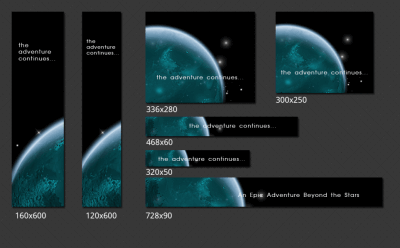
How to find the correct image sizes for AdWords to be visible on all available ad places? Image ad sizes for AdWords is 20 different image ad sizes, plus, plus
Adwords requires at least twenty different images when you want to utilize all the available ad spaces. AdWords image ad sizes is a true maze. There is 20 standard dimensjons and in addition to this there is different regional sizes. An overview is available here. In addition to this the wizard that generates HTML5 ads and other specialized ads requires other image sizes. In addition to the this the requirements tend to change periodically.
We thin it’s helpful creating a set of layered Adobe Photoshop files that we use as templates. This is the list of sizes uses when creating Adwords ads by default:

Creating the right image sizes with ads for AdWords is almost like navigating through a maze. This is the standard list we use in 2015. -
Tools to autmate and speed up you workday
Alfred
https://www.alfredapp.com/remote/
Blog about automating MAC
http://macautomationtips.com/
TextExpander
-
How to evaluate the website technical quality
Website technical quality is important. Not in any way as important as great content, but why loose income caused by technical issues that easily and inexpensively can be solved within a few hours. Before doing anything, you need to know the status. Is there anything that could be improved? What to perform the improvment? How to do this? What would it cost? How long time would it take? Should I do it myself or hire someone? Just Googling it produces many answers.
How strong is your website?
https://website.grader.com/#/
-
How to fight that writers block
HUBSPOT’S
BLOG TOPIC GENERATORDON’T KNOW WHAT TO BLOG ABOUT? LET US THINK OF IDEAS FOR YOU.
http://www.hubspot.com/blog-topic-generator
Fill in the fields with terms (preferably nouns) that you’d like to write about, and we’ll come up with a week’s worth of relevant blog post titles in a matter of seconds!
Disclaimer: Our algorithm isn’t perfect. After you have your titles, you may want to tweak them to be more relevant to your terms and grammatically correct.
-
Bitnami Drupal on EC2 Amazon AWS
Tips for tuning your Bitnami Drupal EC2 instance VPS server
Contact us when you need help with your Drupal or Bitnami running as EC2 instance.
Drupal is a content management platform that allows an individual or community of users to easily publish, manage, and organize a wide variety of content on a website. In general, Drupal is used for community web portals, discussion sites, corporate web sites, intranet applications, personal web sites or blogs, aficionado sites, e-commerce applications, resource directories, and social networking sites. Drupal is easy to extend by plugging in one or more of the dozens of freely available modules.
Please, take a look to the Quick Start Guide to know the basic use of this Stack.Document root
/home/bitnami/apps/drupal/htdocs
The issue with the startpage
Simply run this script:
$ sudo /opt/bitnami/apps/drupal/updateip --appurl /as desiribed in the Bitnami Drupal Wiki
The article described at the other Wiki:
sudo nano /opt/bitnami/apps/drupal/conf/drupal.confwill give you 2 startpages:
http://YourDomain/and
http://YourDomain/drupal/Only the last one works correclty.
Restart Apache on Bitnami Drupal
First find the folder with the script:
sudo find / -iname 'ctlscript.sh'Then go to the folder
cd /opt/bitnami/Then issue the command
./ctlscript.sh restart apacheDocumentation on how to restart Apache
Contact us when you need help with your Drupal or Bitnami running as EC2 instance.