How to optimize WordPress with Ubuntu VPS

Ubuntu Virtual Private Server optimized for WordPress

Author: .

  • Include sitemap in HTML format (The required PHP XSL Module is not installed) error in XML Sitemap Generator for WordPress

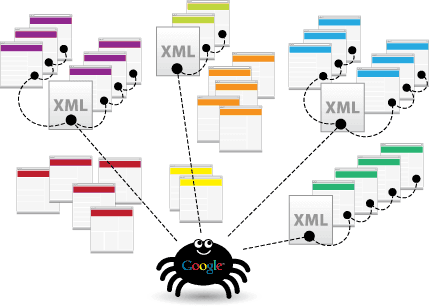
    In WordPress XML sitemap is mandatory to get listed with new pages with Google and Microsoft Bing
    Include sitemap in HTML format (The required PHP XSL Module is not installed)

    Include sitemap in HTML format (The required PHP XSL Module is not installed)

    This post applies to the WordPress plugin;

    Google XML Sitemaps

    from developer:

    Arne Brachhold


    [themedy_alertbox icon=”thumbs-o-up” colour=”green” font_awesome_att=”” custom_colour=””]
    Call TBT when you need help
    Ask for a quote. We are always here to help. We also work by the hour at $ 99,- USD. We accept payments by PayPal.
    [/themedy_alertbox]


    The dialog box «Include sitemap in HTML»  is unavailable

    If you are using the XML Sitemap Generator for WordPress 4.0.2 on Ubunt and are unable to tick the box “Include sitemap in HTML format” then you might get this error message:

    Include sitemap in HTML format (The required PHP XSL Module is not installed)

    On Ubuntu you can solv this by typing

    sudo apt-get install php5-xsl

    After the installation is done you need to restart Apache:

    sudo service apache2 restart

    The reload the setting page, and you should be able to tick the box.

    Google xml sitemaps by Arne Brachhold

    [themedy_alertbox icon=”thumbs-o-up” colour=”green” font_awesome_att=”” custom_colour=””]
    Call TBT when you need help
    Ask for a quote. We are always here to help. We also work by the hour at $ 99,- USD. We accept payments by PayPal.
    [/themedy_alertbox]
  • How to configure DKIM on Exchange 2010 server

    How to configure DKIM on Exchange 2010 server

    https://www.youtube.com/watch?v=98oc_5bjjkc


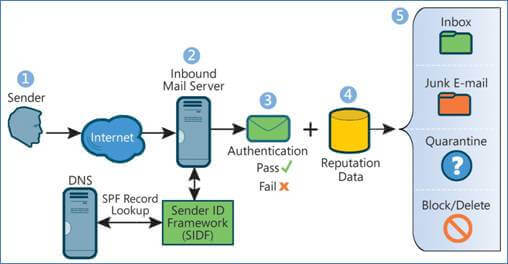
    Spf flow


    References

    Domainkeys identified mail exchange 2010 ( Google search)

    DKIM setup exchange   ( Google search)

    DKIM and Exchange 2010 (Fvorum)


    Software

    A.

    EA DomainKeys/DKIM for Exchange Server and IIS SMTP Service Price USD 300,- $

    Download the free trial first and see how it works.


     B.

    Open source Exchange Module for DKIM signing

    Homepage for the project


    C.

    http://www.netal.com/dkimx.htm


    You can set DKIM/DomainKeys in Exchange Server like this:

    Set up DKIM in Exchange 2007/2010/2013 – Tutorial

    Spf dns anti spam

    [themedy_alertbox icon=”thumbs-o-up” colour=”green” font_awesome_att=”” custom_colour=””]

    Call TBT when you need help

    Ask for a quote. We are always here to help.  We also work by the hour at $ 99,- USD.  We accept payments by PayPal.

    [/themedy_alertbox]
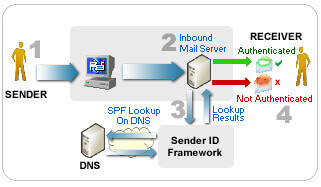
    DKIM/DomainKeys – signning your email with DKIM/DomainKeys

    Set up DKIM in Exchange Server 2007/2010/2013
    Set up DKIM in Exchange Server 2003
    Set up DKIM in IIS SMTP Service

    PTR Record

    Keep valid reverse DNS records for the IP address(es).

    PTR record, or pointer record, enables someone to perform a reverse DNS lookup. This allows them to determine your domain name based on your IP address. Because generic domain names without a PTR are often associated with spammers, incoming mail servers identify email from hosts without PTR records as spam.

    You should ask your IP address(es) provider (not domain provider) to set a PTR record for your IP address(es) and I suggest that you use your domain name as the record value.

    SPF,DomainKeys and DKIM Test Tool


    Realtime Black List

    Check if your IP address(es) or linked domain(s) in email body is in realtime black list by the following online tools:

    http://www.anti-abuse.org/multi-rbl-check/
    http://mxtoolbox.com/blacklists.aspx

    http://whatismyipaddress.com/blacklist-check


    SPF Record – publishing an SPF record.
    SPF Record Project
    Sender ID Framework SPF Record Wizard

    Whiteliste Yahoo IP

    You may wish to contact yahoo and ask to have your IP whitelisted.

    http://help.yahoo.com/l/us/yahoo/mail/postmaster/forms_index.html


    DKIM and SPF has been around for many years and in 2014 it seems that many major e-mail providers has implemented this tecnology actively. This means that many legitime e-mails are rejected due to inadequate og false DKIM og SPF configuration.

    Sender Policy Framework – SPF on Wikipedia

    DomainKeys Identified Mail – DKIM on Wikipedia

    SPF wizard

    http://www.spfwizard.net/

    http://www.microsoft.com/mscorp/safety/content/technologies/senderid/wizard/


    [themedy_alertbox icon=”thumbs-o-up” colour=”green” font_awesome_att=”” custom_colour=””]

    Call TBT when you need help

    Ask for a quote. We are always here to help.  We also work by the hour at $ 99,- USD.  We accept payments by PayPal.

    [/themedy_alertbox]

  • Using video in you WordPress blog

    Using video in you WordPress blog

    When YouTube or Vimeo isn´t an option. Then you should consider these solutions:

    logo-1

    Netflix and many other large vendors use the Amazon AWS data centers for the whole process of distribution videos. NetFlix has an large amount of EC2 VPS servers and uses the streaming solutions from Amazon. Digital Media on AWS.  Amazon Web Services provides a set of secure and on-demand storage, archive, computing, transcoding, streaming, and application services for media companies. Resources about streaming video

    logo2

    VideoPress is a solution from the same company that creates WordPress. Quite possibly the easiest way to upload beautiful videos to your blog. It’s inexpensive, ad-free, and it just works with WordPress. You’ll be able to upload videos from your phone or through your WP admin directly to your blog.

    Strict privacy control

    VideoPress uses your blog’s built in privacy settings to determine who can see your videos.

    No max time duration

    With VideoPress, you can upload videos up to 1GB in size, with no cap on the length of your video.

    logo3
    JW Player Publish Your Videos

    Get broadcast-quality playback everywhere, every time. Customize your player, distribute video, and view your analytics. Hundreds of features work seamlessly in HTML5 & Flash.

    Run Video Ads

    Serve desktop & mobile video ads. Integrate with any ad server or network or set up advanced integrations with our ads API. Everything ads, out of the box.

    Stream With Us

    Upload any audio or video file and we’ll optimize it for all screens. Manage your entire video library and deliver billions of streams reliably and fast.

  • Using DreamWeaver with SFTP on Ubuntu EC2 instances

    Using DreamWeaver with SFTP on Ubuntu EC2 instances

    EC2 Linux Ubuntu VPS is not configured for connections with a password by default. This is a requirement for using SFTP with Adobe DreamWeaver.

    This is a how to configure the VPS server to accept connections using SFTP with password authentication.

    Allow login with password

    Open the SSHD config file:

    nano /etc/ssh/sshd_config
    

    Find the line:

    PasswordAuthentication no
    

    and change it to:

    PasswordAuthentication yes
    

    Stop the user from watching other areas of the server

    NB: This is currently not working:

    At the end of the file add the following sentences:

    Match Group sftpusers
    ChrootDirectory /var/www/%u
    ForceCommand internal-sftp
    

    Save the file. Then restart the SSH server.

    service ssh restart
    

    Create the restricted SFTP user group

    You will now create a SFTP group:

    sudo addgroup sftpusers
    

    Create the SFTP only user and add him to the group sftpusers

    Replace “USER” with your username.

    useradd -d /var/www/ -s /usr/lib/sftp-server -M -N -g sftpusers "USER"
    

    Now give “USER” a password:

    passwd "USER"
    

    Then add the user to another group:

    usermod -a -G www-data "USER"
    

    Create the user homedir and website root dir

    We are starting with creating the folder that will be the home directory for the user and the root folder for the website.
    Replace “DOMAIN” with your domain.

    sudo su
    cd /var/www/
    mkdir -p /var/www/"DOMAIN" /var/www/.ssh
    chown "USER":sftpusers /var/www/"DOMAIN" /var/www/.ssh
    chown "USER":www-data /var/www/"DOMAIN" /var/www/.ssh
    sudo chown -R www-data /var/www
    chmod 700 /var/www/.ssh
    

    Create the website in apache.

    cd /etc/apache2/sites-enabled
    ls
    

    Duplicate and modify an existing  site or create at new site
    as described in this how to:
    How to add a websites to EC2 Ubuntu LTS instances

    Add a shell to the group

    nano /etc/shells
    

    Add the following to the bottom of the file and save:

    /usr/lib/sftp-server
    

    References

    How to set up an SFT user to login with a password to an EC2 ubuntu server?

    Setting up SFTP on Ubuntu

    Ubuntu SFTP-Only Account How-to

  • DotNetNuke to WordPress migration

    DotNetNuke to WordPress migration

    Offline migration using MarsEdit 3

    If you have small number og artickles a solution might be to open the DotNetNuke articles in the offline editor MarsEdit 3 and the re-publish them to your new WordPress. This requires som work, but it’s budget friendly. It’s also a fast way to correct minor issues that might occur during or after the move.

    Companies performing DotNetNuke to WorPress migration

    Some companies spezialize in migrating between CMS’s. It’s well wort the money using these services in stead of figuring out the everything yourself.

    gConverter

    CMS2CMS

    [themedy_alertbox icon=”thumbs-o-up” colour=”green” font_awesome_att=”” custom_colour=””]

    Call TBT when you need help

    Ask for a quote. We are always here to help.  We also work by the hour at $ 99,- USD.  We accept payments by PayPal.

    [/themedy_alertbox]

    How To migrate from DotNetNuke to WordPress

    Searching google for:

    convert dotnetnuke to wordpress
    migrate dotnetnuke to wordpress
    move dotnetnuke to wordpress
    

    Should provide you with plenty of sources for performing the job yourself.

    Here are som:

    From DNN to WordPress

    Moving DotNetNuke to WordPress, need .htaccess help

  • How to install Apache, PHP7 and MySQL connector

    Setting up your MySQL database on Amazon RDS

    Use the free MySQL WorkBench to create your database, create database user, password and assign rights on Amazon RDS.

    Alternatively use Sequel Pro or use Navicat to set up your database on the  Amazon RDS database server. It dos not matter which of the 3 tools you are using.

    Install Apache2, PHP7, Curl and MySQL connector on Ubuntu

    This will install:

    • Apache
    • PHP7
    • MySQL database connector to access Amazon RDS. You will need this connector use the remote Amazon AWS RDS server.
    sudo apt-get install apache2 php7.0 php7.0-mysql libapache2-mod-php

    Install curl, gd and zip

    • Curl is widly used and needed by WordShell.
    • GD is needed by WordPress to change the size of uploaded images.
    • Zip is a easy way to compress directories and files when backing up or moving files and directories.
    sudo apt-get install curl php7.0-curl php7.0-gd zip

    Apache modules to activate

    sudo a2enmod rewrite

    Then restart Apache to activate the change:

    sudo service apache2 restart


  • Defining maximum memory in wp-config.php

    When adding new domain to your server add the follwing lines to wp-config.php

    sudo nano /var/YourFolder/wp-config.php
    

    Find the sentence reading:

    /* That's all, stop editing! Happy blogging. */

    Add the following lines just above

    define('WP_CACHE',true);
    define('WP_MEMORY_LIMIT','256M');