How to optimize WordPress with Ubuntu VPS

Ubuntu Virtual Private Server optimized for WordPress

Author: .

  • How to evaluate the website technical quality

    Website technical quality is important. Not in any way as important as great content, but why loose income caused by technical issues that easily and inexpensively can be solved within a few hours. Before doing anything, you need to know the status. Is there anything that could be improved? What to perform the improvment? How to do this? What would it cost? How long time would it take? Should I do it myself or hire someone? Just Googling it produces many answers.

    How strong is your website?

    https://website.grader.com/#/

  • How to fight that writers block

    HUBSPOT’S
    BLOG TOPIC GENERATOR

    DON’T KNOW WHAT TO BLOG ABOUT? LET US THINK OF IDEAS FOR YOU.

    http://www.hubspot.com/blog-topic-generator

    Fill in the fields with terms (preferably nouns) that you’d like to write about, and we’ll come up with a week’s worth of relevant blog post titles in a matter of seconds!

    Disclaimer: Our algorithm isn’t perfect. After you have your titles, you may want to tweak them to be more relevant to your terms and grammatically correct.

  • Find keywords that will give you access to the best readers

    Find keywords that will give you access to the best readers

    Find keywords to distinguish yourself from the rest and pinpoint the right audience. You need a strategy on howto find keywords that your readers will be using to find the kind of content that you produce.

    Find keywords that targets the right audience

    Many people try to find keywords using a keyword finder. This is a tool for determining the phrases or hashtags that your reader are using to find your pages. Finding these keywords is critical to your success. If you don’t know how potential customers are searching for your website, how can you help them find your pages?

    Find keywords with WordStream paid keyword finder

    WordStream’s PPC keyword suggestion tool is better than a run-of-the-mill keyword finder like the AdWords tool, because it parses your own AdWords search query reports to find your best, most relevant keyword phrases. Since your keyword list is built from the search queries that actual visitors use to find your website, they couldn’t be more specific to your offering—and your audience.

    Use WordStream’s Free Keyword Tool to find keywords. Free keyword suggestion tools are only a starting point. If you are using a free third-party tool then the tool from WordStream is simply the best free keyword finder available. This tool is:

    • More accurate and relevant
      WordStram index over a billion unique keywords. WordStream return more keywords from more diverse sources than any other tool.
    • Faster
      The Free Keyword Tool by WordStream provides near instantaneous results.
    • Free
      WordStreams tool is always completely free. You get 10 free searches up-front, and then 1 free search per tool, per day after that.

    Find keywords and key phrases  with Google

    Keyword Planner from Google is like a workshop for building new Search Network campaigns or expanding existing ones. You can search for keyword and ad group ideas, get historical statistics, see how a list of keywords might perform, and even create a new keyword list by multiplying several lists of keywords together. A free AdWords tool, Keyword Planner can also help you choose competitive bids and budgets to use with your campaigns. Whether you’re new to online advertising or an experienced pro, you can use Keyword Planner to lay the groundwork for a successful campaign.  Learn more.

    [Tweet “These tools enables you to search for keyword and ad group ideas. Find historical statistics for keywords”]

    Find keywords with Übersuggest the free keyword suggestion tool

    Get keyword ideas with Übersuggest the free keyword suggestion tool that makes good use of different suggest services.

    How does it work?

    • Write a term in the box.
    • Choose a language and a source. Übersuggest can get suggestions either from regular Web search or from search verticals like Shopping, News or Video (more to come).
    • Übersuggest takes your base term, add a letter or a digit in front of it, and extracts suggestions for it.
    • Click on each word to get further suggestions based on that term.
    • Add each keyword to your basket clicking on the plus sign on its left.
    • Add all visible keywords to your basket clicking on the large grey button.

    With this free keyword tool you can instantly get thousands of keyword ideas from real user queries! Use the keywords to get inspiration for your next blog post, or to optimize your PPC campaigns.


    http://www.semrush.com/features/keyword-research/


    http://keywordtool.io
    This isa free tool that that show  some of the most popular keywords searched.


    [Tweet “Locating the the right audience is the key to Internet marketing. Finding the right keyword phrase”]

     Howto find keywords that will give you access to the best readers

    Find keywords that will give you access to the best readers

    HashTags

    http://hashtagify.me


    https://twitter.com/search-advanced

    Type your keyword and select the filter “questions”
    Twitter will show you all the questions that folks in are asking.

  • Writing good headlines for your blog posts is crucial to capture the readers attention

    Writing good headlines for your blog posts is crucial to capture the readers attention

    Research proves that readers share emotional and positive headlines with their social networks. Some headline types get more attention than others for social shares, traffic, and search engine ranking.

    On the average, five times as many people read the headline as read the body copy. When you have written your headline, you have spent eighty cents out of your dollar. 
    —David Ogilvy

    Writing good headlines is more crucial than you might think

    Never take easy on the task of writing good headlines. If you don’t have a compelling headline, then there is a very good chance that your blog post will not be read or shared.

    Online tools to help you writing good headlines

    Want to write better headlines?

    This free blog post headline analyzer will score your overall headline quality and rate its ability to result in social shares, increased traffic, and SEO value.

    Writing good headlines for your blog posts is crucial to capture the readers attention
    Too often the headline is the most neglected part of writing an article. People just gloss over it without taking much time to consider it. In their minds, it’s the cherry on top. No, friends; it’s not.

    We judge a book by the cover and a blog post by the title

    Some headline types get more traction than others for social shares, traffic, and search engine ranking. The headline analyzer helps you understand your headline types to capitalize on this research.

    List, “how to”, and question headlines typically see the strongest results for click throughs. The headline analyzer shows you this and lets you know when you can improve a generic headline.

    Writing good headlines
    What, why, how, or when are trigger words. Typically use “why” and “how” the most. You’ll use either a trigger word or a number.

    What is the headline analyzer?

    This tool will analyze your headline to determine the Emotional Marketing Value (EMV) score. Reaching your customers in an deep and emotional way is a key to success. The headline is unquestionably the most important part  to reach customers.

    Your headline will be analyzed and scored based on the total number of EMV words it has in relation to the total number of words it contains. This will determine the EMV score of your headline.

    In addition to the EMV score, You will find out which emotion inside your customer’s your headline most impacts:

    Run your headline through EMV headline analyzer to find the emotional marketing value of your headline.

    Source references about writing good headlines

    This post is inspired by the following posts:

    5 Easy Tricks to Help You Write Catchy Headlines

    Google search

    CoSchedule Headline Analyzer

    [themedy_alertbox icon=”thumbs-o-up” colour=”green” font_awesome_att=”” custom_colour=””]

    Call TBT when you need help

    Ask for a quote. We are always here to help.  We also work by the hour at $ 99,- USD.  We accept payments by PayPal.

    [/themedy_alertbox]

  • Bitnami Drupal on EC2 Amazon AWS

    Tips for tuning your Bitnami Drupal EC2 instance VPS server


    Contact  us when you need help with your Drupal or Bitnami running as EC2 instance.

    Bitnami Drupal HowTO

    Drupal is a content management platform that allows an individual or community of users to easily publish, manage, and organize a wide variety of content on a website. In general, Drupal is used for community web portals, discussion sites, corporate web sites, intranet applications, personal web sites or blogs, aficionado sites, e-commerce applications, resource directories, and social networking sites. Drupal is easy to extend by plugging in one or more of the dozens of freely available modules.
    Please, take a look to the Quick Start Guide to know the basic use of this Stack.

    Document root

    /home/bitnami/apps/drupal/htdocs

    The issue with the startpage

    Simply run this script:

    $ sudo /opt/bitnami/apps/drupal/updateip --appurl /
    

    as desiribed in the Bitnami Drupal Wiki

    The article described at the other Wiki:

    sudo nano /opt/bitnami/apps/drupal/conf/drupal.conf  
    

    will give you 2 startpages:

    http://YourDomain/
    

    and

    http://YourDomain/drupal/
    

    Only the last one works correclty.

    Restart Apache on Bitnami Drupal

    First find the folder with the script:

    sudo find / -iname 'ctlscript.sh'  
    

    Then go to the folder

    cd /opt/bitnami/  
    

    Then issue the command

    ./ctlscript.sh restart apache
    

    Documentation on how to restart Apache


    Contact  us when you need help with your Drupal or Bitnami running as EC2 instance.


  • Tune apache performance using Apache MPM prefork module

    Tune apache performance using Apache MPM prefork module

    There could be many reasons why your Apache web server is slow. One of them can be that Apache needs tuning. Tuning the Apache performance using the Apache MPM prefork module is one of them.

    Tune Apache performance using MPM Prefork module

    StartServers: 30% of MaxClients
    MinSpareServers: 5% of MaxClients
    MaxSpareServers: 10% of MaxClients
    MaxRequestWorkers = MaxClients
    MaxConnectionsPerChild= 10000 (To avoid problem with memory leaks in WordPress plugin themes and apps)

     
    Edit the file with this command:

    sudo nano /etc/apache2/mods-available/mpm_prefork.conf


    Try these values if Apache uses 70 MB under heavy load and the server has 1 GB RAM.

    <IfModule mpm_prefork_module>
     StartServers 8
     MinSpareServers 8
     MaxSpareServers 9
     MaxRequestWorkers 9
     MaxConnectionsPerChild 100
    </IfModule>
    

    Save the changes

    Ctrl+X - Y

    Restart Apache

    sudo service apache2 restart

    It might make the server a bit slower, but there will be the most available memory, and you will not hit the roof. Hitting the limit will almost stop the server.

    How to calculate the values

    The initial  Ubuntu OS install uses 350 MB RAM – memory – and the server has 1 GB with memory.

    Then there is half a gigabyte to run Apache clients.

    You measure that each Apache instance uses 33 MB of memory. Then you would be able to run 18 servers with 650 MB available RAM. 650 MB RAM allows ten customers to download content from your site simultaneously. Often the browser uses several simultaneous instances so one user could use several Apache instances. Upgrade to 4 GB of RAM then you would have 3.5 GB available to serve your customers with Apache. 3,5 GB of available memory would suggest a “MaxClients” settings increased from ten clients to 106.


    Tool nr 1 to help you determine a useful configuration

    Check Apache Httpd MPM Config Limits

    This Perl script compares the size of running Apache HTTP processes. This consist of the configured Prefork, worker and event MPM limits. Measured towards the server’s available memory. You might get an error message if the setting limits exceed the server’s available memory.

    Check the website for the newest release.

    https://code.google.com/archive/p/check-httpd-limits/downloads

    Go to the user home folder

    cd ~

    Create a folder

    mkdir apache-memory-test

    Go to the newly created folder

    cd apache-memory-test

    Download the latest version. This is for version 2.5:

    wget https://storage.googleapis.com/google-code-archive-downloads/v2/code.google.com/check-httpd-limits/check_httpd_limits-2.5.zip

    Unzip the file

    unzip check_httpd_limits-2.5.zip

    Make the script executable:

    chmod u+x check_httpd_limits.pl

    Run the script as root

    sudo ./check_httpd_limits.pl

    Open a bunch of web pages while you run the script many times to get an impression of the average memory consumed.


    Tool number 2

    Please read this tutorial about oApache” performance using optimizing MPM Prefork module


    Create a folder and download and unzip the script as you did with “Tool 1”

    Make the script executable

    chmod u+x ap.sh

    Run the script

    ./ap.sh


    Sources for this article

  • How to activate SSL with a free valid certificate

    How to activate SSL with a free valid certificate

    How to allow multiple SSL hosts on a single IP in Ubuntu

    Open the file:

    sudo nano /etc/apache2/ports.conf

    Find the following line:

    <IfModule ssl_module>
    Listen 443
    

    and change it to:

    <IfModule ssl_module>
    Listen 443
    SSLStrictSNIVHostCheck off

    Then restart Apache

    service apache2 restart


    To activate and de-activate SSL

    Activate SSL by typing the command

    sudo a2enmod ssl


    Then restart Apache to publish the change

    service apache2 restart

    [themedy_button url=”https://www.wpjeos.no/how-to-add-a-websites-to-ec2-ubuntu-lts-instances/” icon=”wrench” font_awesome_att=”” label=”How to set up virtual websites and domains with SSL” colour=”blue” colour_custom=”” size=”large” edge=”rounded” target=”_self”]

    How to get free SSL certificates

    Claim your free SSL certificate on CloudFlare.com
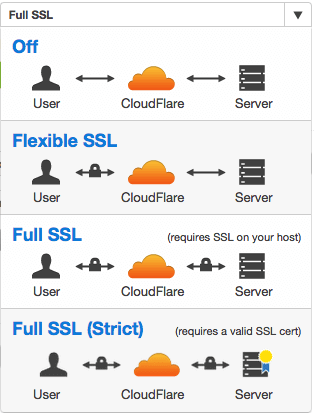
    Claim your free SSL certificate on CloudFlare.com by choosing “Full SSL” in the menu.

    You can use the free not valid SSL certificate in Ubuntu together with the free valid certificate you get from CloudFlare. SSL will give you better SEO ranking on Google. This is the fastest and easiest way to get a valid SSL on your VPS. By leaving most of the process to the cloud in the spirit of JeOS. The easiest is to choose the “Full SSL” option. The you can use the native not valid Ubuntu certificates.

    Strict mode full SSL

    If you generate certificates in the CloudFlare admin panel and install them in Ubuntu, then you should use the Full SSL (Strict) choice. Your site is encrypted in either choice.

    The Let’s Encrypt project

    An alternative to CloudFlare is to acquire your free SSL certificate from the Let’s Encrypt project. Let’s Encrypt is a free, automated, and open certificate authority.

    [themedy_button url=”https://www.wpjeos.no/how-to-add-a-websites-to-ec2-ubuntu-lts-instances/” icon=”wrench” font_awesome_att=”” label=”How to set up virtual websites and domains with SSL” colour=”blue” colour_custom=”” size=”large” edge=”rounded” target=”_self”]